Revenue by Transaction Items
The Revenue by Transaction Items report helps users to visualize a property’s revenue by grouping transaction items under each category or sub-category. It displays revenue for each item across daily, month-to-date (MTD), and year-to-date (YTD) periods.
Perform the following steps to generate the report:
Navigate to Reports ➜ Dynamic Reports ➜ Revenue/Forecasting ➜ Revenue by Transaction Items.
Refer to the following table and fill in the fields.
|
Field |
Description |
|---|---|
|
Report Name |
Revenue by Transaction Items. |
|
Property |
This is a mandatory multi-select drop-down list that displays the current property by default. Users can select the preferred properties for report generation. |
|
Group By |
This is a mandatory single-select drop-down list that displays the following options:
|
|
Type |
This is a mandatory single-select drop-down list that displays the following options:
|
|
Date |
The start date for report generation. This is a mandatory field that displays the current property date by default. Users can select the past, present, or future dates. |
|
Report Current & Previous Years Based On |
This is a mandatory single-select drop-down list that displays the following options:
|
Click Run to generate the report.
Click Save to save the report under User Favorites section.
Sample Report
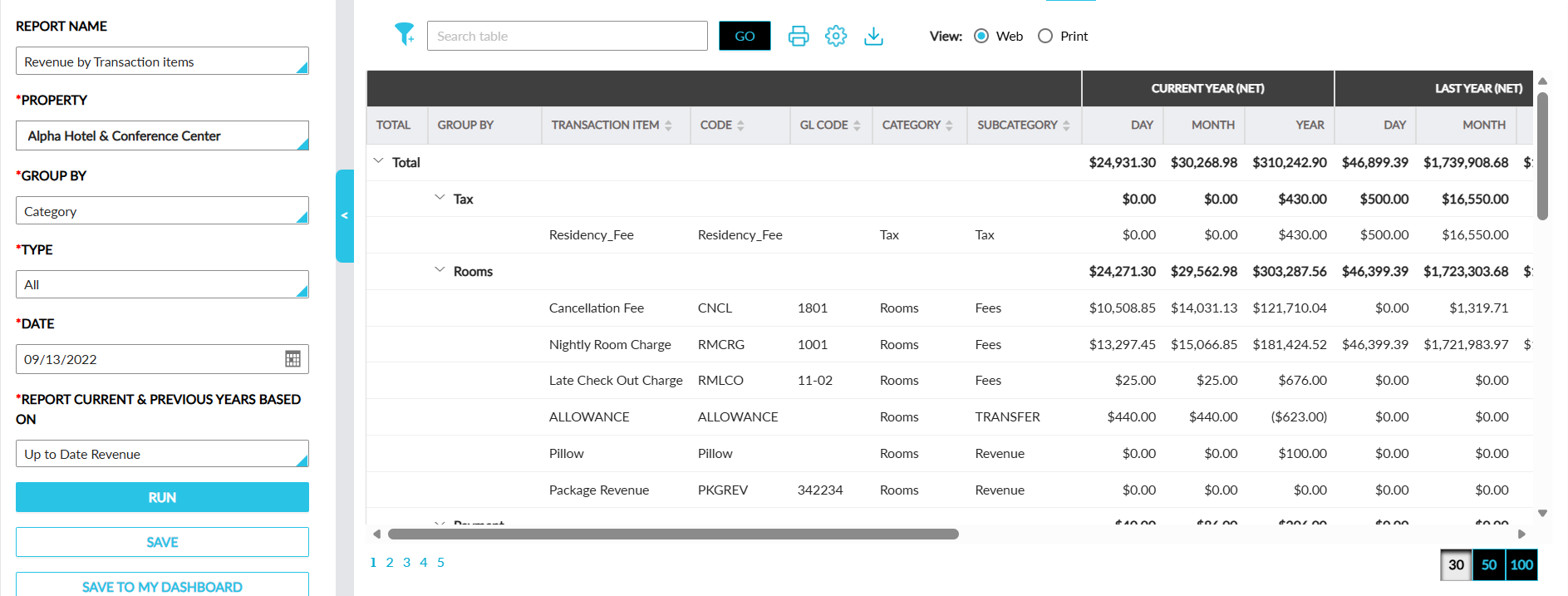
Report Fields
This report displays the following fields:
|
Field |
Description |
|---|---|
|
Total |
The total revenue for both the current and previous year, including net, tax, and gross amounts, is displayed segmented by day, month, and the entire year with an accordion. |
|
Group By |
The group by option selected is displayed with an accordion. |
|
Transaction Item |
The transaction item name. This column can be sorted and filtered. |
|
Code |
The transaction item code. This column can be sorted. |
|
GL Code |
The GL code of the transaction item. This column can be sorted. |
|
Category |
The category of the transaction item. This column can be sorted. |
|
Subcategory |
The subcategory of the transaction item. This column can be sorted. |
|
Current Year (NET) |
|
|
Day |
The total revenue of the item for the selected date. |
|
Month |
The total revenue generated by the transaction item for the month of the selected date. |
|
Year |
The total revenue generated by the transaction item for the year of the selected date. |
|
Last Year (NET) |
|
|
Day |
The total revenue of the item on the selected date for the previous year. |
|
Month |
The total revenue generated by the transaction item on the month of the selected date for the previous year. |
|
Year |
The total revenue generated by the transaction item on the previous year of the selected date. |
|
Current Year (TAX) |
|
|
Day |
The total tax charged for the transaction item on the selected date. |
|
Month |
The total tax charged for the transaction item on the month of the selected date. |
|
Year |
The total tax charged for the transaction item on the year of the selected date. |
|
Last Year (TAX) |
|
|
Day |
The total tax of the item on the selected date for the previous year. |
|
Month |
The total tax charged for the transaction item on the month of the selected date for previous year. |
|
Year |
The total tax charged for the transaction item on the previous year of the selected date. |
|
Current Year (GROSS) |
|
|
Day |
The total gross (inclusive of revenue and tax) of the item on the selected date. |
|
Month |
The total gross (inclusive of revenue and tax) of the item on the month of the selected date. |
|
Year |
The total gross (inclusive of revenue and tax) of the item on the year of the selected date. |
|
Last Year (GROSS) |
|
|
Day |
The total gross (inclusive of revenue and tax) of the item on the selected date for the previous year. |
|
Month |
The total gross (inclusive of revenue and tax) of the item on the month of the selected date for the previous year. |
|
Year |
The total gross (inclusive of revenue and tax) of the item on the previous year of the selected date. |